
Products / SMA Sync
Synchronize intelligently.
Edit freely. Stay in sync.
Multicamera footage and separate sound, synchronized while your cards are still copying, then handed straight to Premiere Pro, Final Cut Pro or DaVinci Resolve.
Invitation-only. There's no public download during Early Access.
THE FILM · 2 MINUTES
From the camera card to a cut, in two minutes.
With voice-over and on-screen captions. 10.6 MB.
WHAT IT DOES
From the camera cards to a synchronized timeline, ready to cut.
By the time the last card has copied, the sync is usually done.
-
1
Copy and check each card
Each card is copied to your footage drive and proved against the card, with an optional second copy to a backup drive. The sound is read as it copies.
-
2
Line everything up
Sound first, checked against every camera's clock, with the clock to fall back on when a clip has no usable sound. No clapper or timecode needed.
-
3
Hand over a project
One click opens an organised project in Premiere Pro, or exports one for Final Cut Pro and DaVinci Resolve, with the day split into moments.
HOW IT SYNCS
Sound is the first method, not the only one.
When the sound is clear, SMA Sync locks clips by their audio. When it isn't, the clip isn't dropped: it's placed with the strongest evidence available, and the timeline shows which.
- SOUNDWhole-length sound matching
- Every clip is searched against the full length of every other camera and recorder, not just a few seconds either side. Long gaps between takes don't stop a match.
- SOUND + CLOCKEach camera's clock as a second opinion
- SMA Sync learns how far each camera's clock is from the others. A weak sound match that agrees with the clock is accepted; one that strongly disagrees is flagged for you instead of being trusted blindly.
- CLOCKNo usable sound? Placed by the clock
- Clips with no sound, or too little to match, are placed from the camera's own clock, corrected by what the matched clips taught it. Even a camera set to another time zone is caught.
- BY HANDYou have the final say
- Any clip can be moved by hand in SMA Sync's timeline, and it stays where you put it.
- ALWAYS ONDrift corrected along long clips
- Camera clocks run slightly fast or slow, often a frame or two per hour. SMA Sync measures each camera's drift against the recorder, so a speech or ceremony stays in sync to the end, not just at the start.
REAL-WORLD FOOTAGE
Messy shoots welcome.
Real events don't arrive as tidy matching files. SMA Sync is built for the day as it was actually shot.
- HD, 4K and mixed resolutionsSyncing works on sound and time, not pixels. A 4K shoot gives you 4K sequences.
- Mixed frame ratesCameras at different frame rates on the same day, in one timeline. Phone footage with a variable frame rate is recognised and noted.
- Short clipsQuick cutaways and seconds-long grabs are matched when their sound allows, and placed by the camera's clock when it doesn't.
- Slow motionRecognised by its frame rate, placed where it was recorded, and marked, because it plays longer than the moment it captured.
- Phones, drones and silent camerasPhones are recognised by their file names, silent angles are placed by clock, and a clock set to the wrong time zone is caught.
- Many cards, many foldersFootage split across cards and folders is gathered by device, so each camera is one angle however many cards it filled.
- Stray clips set asideA clip from another day, or a camera whose clock was never set, isn't stretched across your timeline. It's set aside, with the reason.
- Card after cardFinish one card, insert the next. The previous one keeps being checked in the background.
DELIVERED READY TO CUT
Not just a synced timeline. A head start on the edit.
SMA Sync splits the day into moments and, if you want them, prepares first cuts. Tick what goes into the project before you send it.
- Full Day
- Every camera and recorder lined up from first clip to last, for scrubbing the day or cutting long-form.
- A sequence per moment
- The ceremony, the speeches, the first dance, each starting at 00:00. Rename, split or remove moments first; the names become your sequence names.
- Rough cuts
- A first cut between the angles for each moment, guided by what was said and the key moments. Watch it in SMA Sync before you send it.
- Highlight draft
- Key moments, quotes and pictures from across the day, in the order they happened, at 1, 3 or 5 minutes.
- The right sound for each moment
- Hear every source for a moment and see which is clearest. Your choice goes on A1/A2; the camera sound stays in the sequence, switched off.
- Premiere Pro, Final Cut Pro or DaVinci Resolve
- Premiere gets a native project in one click. For Final Cut Pro and DaVinci Resolve, the same sequences are exported as one FCPXML file: File → Import → XML in Final Cut, File → Import → Timeline in Resolve.
A clean hand-over inside Premiere Pro
The SMA Sync panel builds the project inside Premiere, so it opens as a native, organised project: sequences in folders, footage in a bin per camera, every clip linked to its media. Clips are stored once, so the extra sequences add no weight. The project sits in the job's footage folder under SMA Sync\Project Files, so the whole job moves as one folder.
AFTER THE HAND-OVER
SMA Sync doesn't stop at the export. It stays with your edit.
Most sync tools hand over a file and are done. SMA Sync keeps track of the timeline it sent, so it can see what has happened in Premiere Pro since, and help you keep the edit in sync.
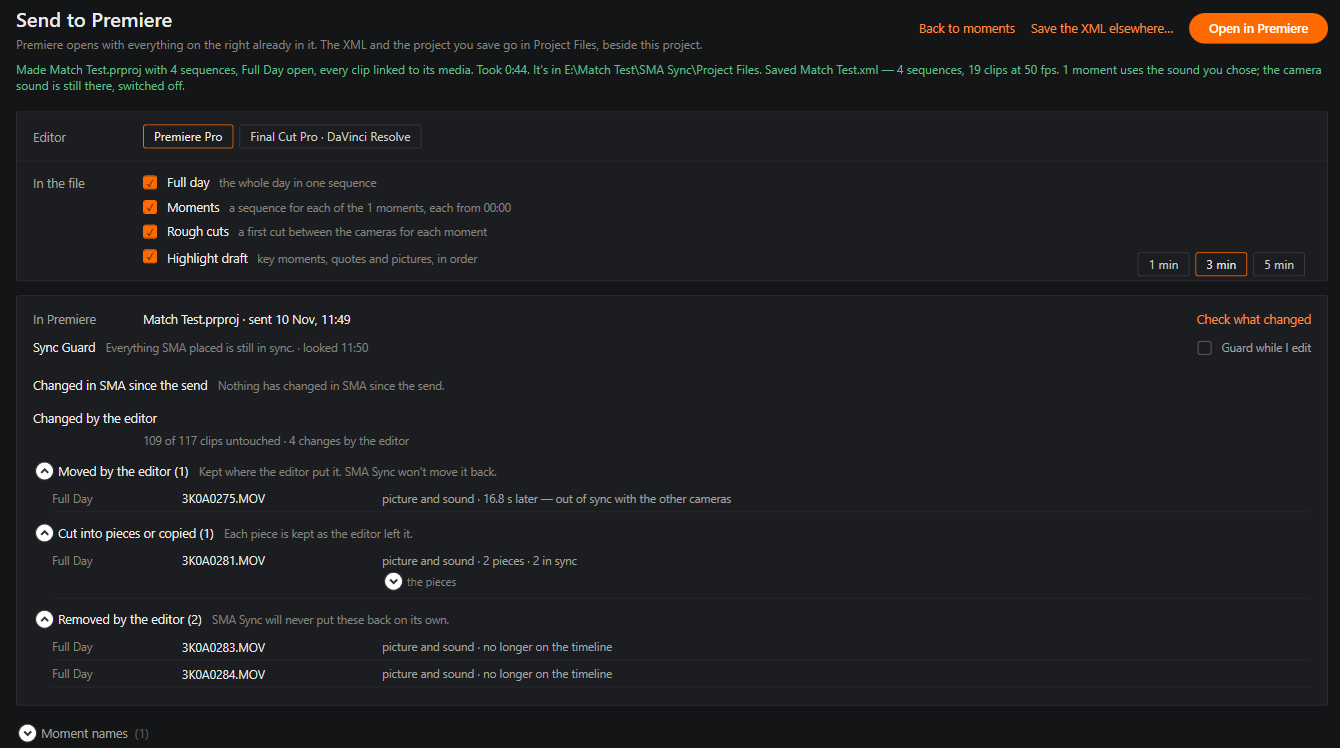
Check Premiere
One click reads your Premiere project back and shows what has changed since it was sent: what you changed in the edit, and what changed in SMA Sync.
- Look without touching. Checking only reads the project.
- Your edits stay yours. Every difference is a proposal you tick or leave; moves, cuts and removals you made are kept.
- Apply safely. Premiere saves first and a copy of the project is kept. Only ticked edits are made, each on its exact clip, and every clip is checked again afterwards.
Sync Guard
A trim, a nudge or a ripple edit can knock a clip a few frames out of sync with its sound without anyone noticing until the review. Sync Guard notices.
- Finds slipped clips by comparing where SMA Sync placed them with where they sit now.
- Slips them back, each correction shown first and applied with the same safe steps.
- Watches while you edit, if you turn it on: a look every 10 minutes while Premiere Pro is open.
THE INTERFACE
A professional workspace that's a pleasure to use.
Dark and calm like an edit suite, with nothing that isn't about the job. Every step says what it's doing, and every result says how sure it is.
- Start editing soonerSynchronization happens during the copy, not after it.
- Fewer manual fixesFootage is matched across all cameras and recorders, and doubtful clips are flagged.
- Safer mediaVerified copies, an optional backup, and nothing on the card is ever changed.
- Your files stay yoursSMA Sync never deletes or locks your footage or projects.
SYSTEM REQUIREMENTS
What you need
- System
- Windows 10 or Windows 11, 64-bit. No administrator rights needed to install.
- Editing software
- Premiere Pro (tested with Premiere Pro 2026; versions from 2020 onward should work, tell us if yours doesn't). Or Final Cut Pro or DaVinci Resolve, through FCPXML.
- Computer
- If it runs Premiere Pro comfortably, it runs SMA Sync. A graphics card with Vulkan support speeds up speech search, but isn't required.
- Disk space
- About 550 MB for SMA Sync, plus room for your footage.
- Internet
- Once, to activate. After that, SMA Sync works offline.
EARLY ACCESS
SMA Sync is in private Early Access testing.
- Invitation-only. Each tester receives a personal licence key and a personal download link by email.
- 30 days of full use, counted from the day you activate, not the day you're invited.
- One computer per licence. Moving to a new computer can be arranged.
- Your feedback shapes the first public release.
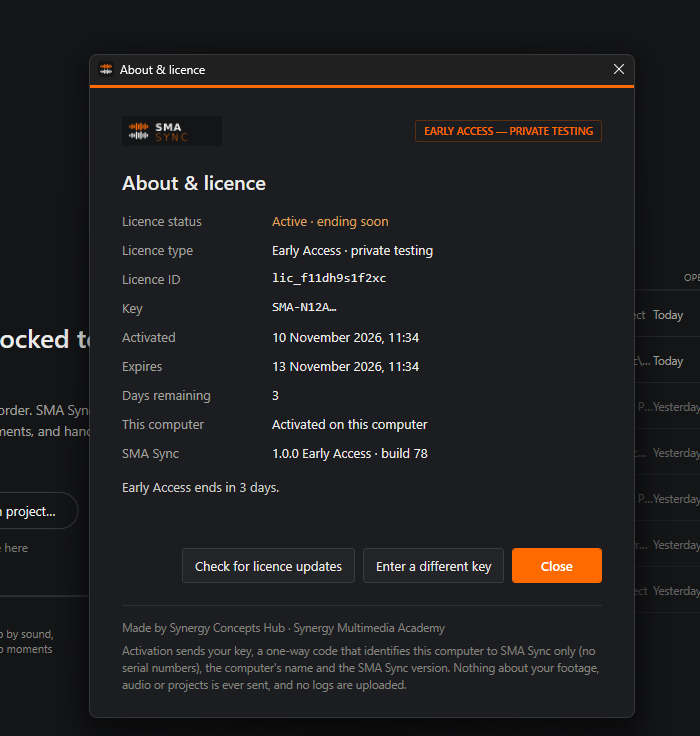
Your licence, its dates and days remaining are always under About & licence.
FOR INVITED TESTERS
Installing and activating
Everything you need is in your invitation email. This page has no download.
- 1Open your personal link
The download link in your invitation email works for 7 days.
- 2Check the file
In PowerShell, the result must match the SHA-256 in your email:
Get-FileHash "<installer>.exe" -Algorithm SHA256
- 3Run the installer
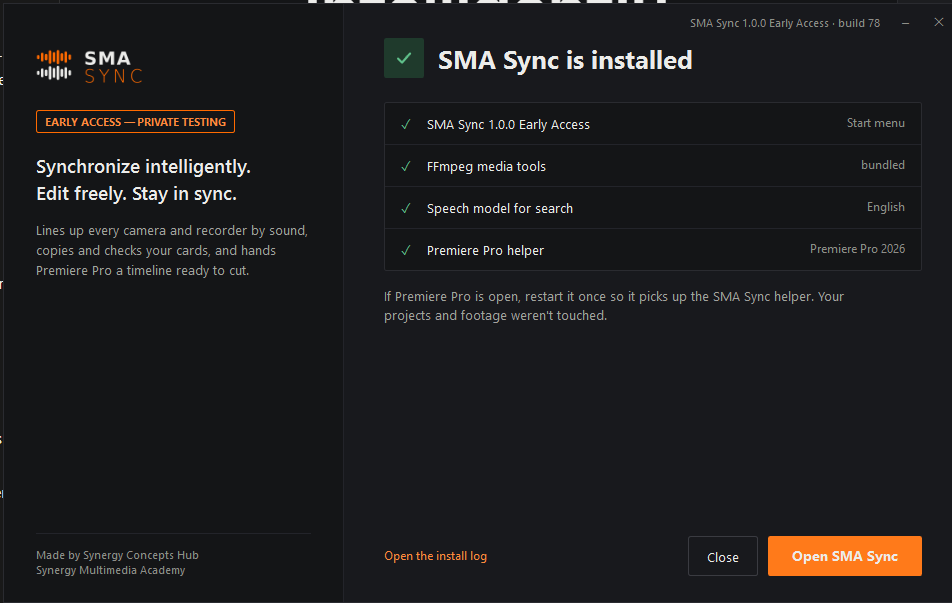
It installs just for you, with the Premiere Pro panel if Premiere is found, in under a minute. Early Access builds aren't code-signed yet, so Windows may show SmartScreen: choose More info, then Run anyway.
- 4Activate
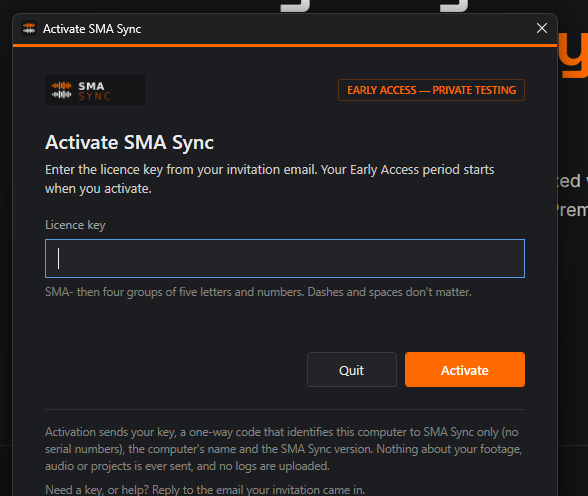
Open SMA Sync, enter your licence key and choose Activate. Your 30 days start then.
Support
Early Access testers: reply to your invitation email. Everyone else: get in touch through our contact page.